
Confirm Before Placing an Order
Use it when the customer should see the final price, including shipping and tax, before any money moves.
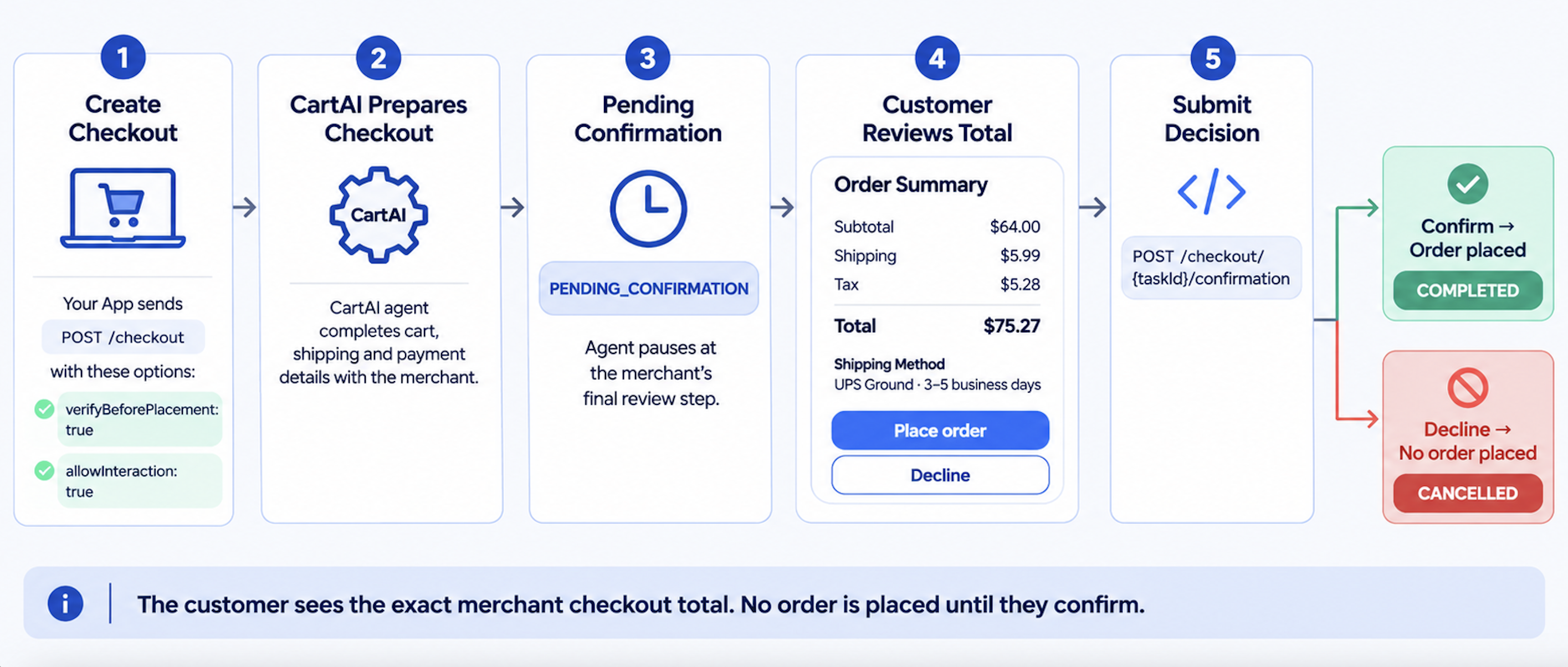
By default, the CartAI agent places the order as soon as checkout is ready. With Pending Confirmation, the agent stops on the merchant's final review step, shows you the real total, and waits. The order is only placed once your customer says yes.
Use it when the customer should see the final price, including shipping and tax, before any money moves.
Why It Matters
- No surprise totals. The customer sees the exact subtotal, shipping, tax and total the merchant is charging.
- The customer decides. Nothing is ordered until they confirm. If they decline, the task is cancelled and no order is placed.
- Works with polling or webhooks. Pick whichever fits your backend.
How It Works
Your App                     CartAI Agent                 Merchant            Customer
    │                             │                           │                   │
    │── POST /checkout ──────────►│                           │                   │
    │   (both flags on)           │── Cart, shipping, ───────►│                   │
    │                             │   payment details         │                   │
    │                             │   Stops at final review   │                   │
    │◄── PENDING_CONFIRMATION ────│                           │                   │
    │    + derivedDetails         │                           │                   │
    │    (webhook, or polling     │                           │                   │
    │    + Get Checkout Task)     │                           │                   │
    │                             │                           │                   │
    │── Show total, ask Confirm / Decline ───────────────────────────────────────►│
    │◄──────────────────────────────────────────────────────────── Customer decides│
    │                             │                           │                   │
    │── POST /checkout/{taskId}/confirmation ►│               │                   │
    │                             │── Places order ──────────►│                   │
│◄── COMPLETED ───────────────│ │ │- Turn it on. Create the checkout task with
verifyBeforePlacementandallowInteractionboth set totrue. - The agent stops before placing the order. The task moves to
PENDING_CONFIRMATION. - You find out. Through a checkout task webhook, or by polling Get Interactive Status.
- Show the customer the order summary: total price, shipping cost and shipping method. The webhook carries these in
derivedDetails. When polling, read them from Get Checkout Task. - Send the decision. Call Send Interactive Inputs with the
confirmationintent. - The task finishes.
COMPLETEDif the customer confirmed,CANCELLEDif they declined.
Step 1 — Turn On Pending Confirmation
When you create the checkout task, set both of these flags in options:
| Flag | What it does |
|---|---|
verifyBeforePlacement | The agent stops on the merchant's final review step instead of placing the order. |
allowInteraction | The agent is allowed to pause and wait for your customer's answer. |
Both flags are required. The agent only waits for confirmation whenverifyBeforePlacementandallowInteractionare bothtrue.
The flags work the same on Create Checkout Task (POST /checkout) and Create Search Checkout Task (POST /search-checkout).
curl --location 'https://api.cartai.ai/checkout' \
  --header 'x-api-key: YOUR_API_KEY_HERE' \
  --header 'Content-Type: application/json' \
  --data '{
    "customer": {
      "contact": {
        "firstName": "Carol",
        "lastName": "Sturka",
        "email": "[email protected]",
        "phone": "+12144444444"
      },
      "shippingAddress": {
        "addressLine1": "609 Royal Crest Dr",
        "addressLine2": "",
        "city": "Richardson",
        "province": "TX",
        "postalCode": "75081",
        "country": "US"
      },
      "shippingMethod": { "strategy": "cheapest" },
      "payment": {
        "provider": "test",
        "data": {
          "cardNumber": "4242424242424242",
          "expiryMonth": "12",
          "expiryYear": "2034",
          "cvv": "444",
          "name": "Carol Sturka"
        }
      }
    },
    "tasks": [
      {
        "url": "https://www.aloyoga.com/products/w1518r-semi-sheer-mock-neck-oasis-tank-ivory",
        "quantity": 1,
        "selectedVariant": { "color": "Ivory", "size": "S" }
      }
    ],
    "options": {
      "verifyBeforePlacement": true,
      "allowInteraction": true
    }
  }'
Save the taskId from the response. You need it for every later call.
Step 2 — Find Out the Order Is Waiting
You can learn that the agent is waiting in two ways. Use whichever suits your backend, or both.
| Option A: Webhooks | Option B: Polling | |
|---|---|---|
| How | CartAI calls your endpoint when the task changes status | You call Get Interactive Status every few seconds |
| Setup | Webhook endpoint configured in the CartAI Admin Portal | Just your API key |
| Best for | Production, real-time updates | Systems that can't receive webhooks, local development, a fallback for missed webhooks |
Option A: Listen for PENDING_CONFIRMATION with requiredInputs
PENDING_CONFIRMATION with requiredInputsWhen the agent reaches the final review step, CartAI sends a checkout task webhook. The agent is waiting for the customer's decision when both of these are true:
statusisPENDING_CONFIRMATION.requiredInputscontains an entry withintentset toconfirmation.
Check both. Don't act onstatusalone. Only ask the customer to confirm when the event also carries theconfirmationrequest inrequiredInputs.
The event's derivedDetails already holds the order summary to show the customer, so you don't need another API call:
{
  "tid": "01a1f857-0a68-7233-abf2-faec6856e343",
  "status": "PENDING_CONFIRMATION",
  "createdAt": "2026-11-25T10:14:02.381Z",
  "groupId": "01a1f857-0a5b-7371-a70e-0513656b448e",
  "merchant": "aloyoga.com",
  "derivedDetails": {
    "pricing": {
      "subtotal": 64.00,
      "shipping": 5.99,
      "tax": 5.28,
      "total": 75.27
    },
    "shippingMethod": { "strategy": "cheapest" },
    "selectedShippingOption": "UPS Ground (3–5 business days) - $5.99"
  },
  "requiredInputs": [
    {
      "type": "input",
      "intent": "confirmation",
      "required": true,
      "value": "",
      "inputSchema": {
        "type": "object",
        "properties": {
          "confirm": { "type": "boolean", "title": "Place the order" },
          "reason":  { "type": "string",  "title": "Reason", "maxLength": 500 }
        },
        "required": ["confirm"]
      }
    }
  ]
}
The event has two parts you need:
| Field | What it gives you |
|---|---|
derivedDetails | The order summary to show the customer: total price, shipping cost and shipping method. See Step 3. |
requiredInputs | The confirmation request. intent: "confirmation" tells you the agent is waiting for the customer's decision, and inputSchema describes the answer to send: confirm (required) and reason (optional). See Step 4. |
(Other webhook fields are left out for brevity. See Checkout Task Webhooks for the full payload.)
app.post("/webhook", async (req, res) => {
  res.status(200).json({ received: true }); // Always acknowledge first

  const payload = req.body;
  if (await isDuplicate(payload)) return;   // CartAI may deliver an event more than once

  // Look for BOTH the PENDING_CONFIRMATION status and the confirmation request
  const confirmation = payload.requiredInputs?.find((i) => i.intent === "confirmation");

  if (payload.status === "PENDING_CONFIRMATION" && confirmation) {
    // derivedDetails → what to show; confirmation.inputSchema → what to send back
    await askCustomerToConfirm(payload.tid, payload.derivedDetails, confirmation.inputSchema); // Steps 3 and 4
  }
});
Option B: Poll Get Interactive Status
Call Get Interactive Status (GET /checkout/{taskId}/status/interactive) every few seconds. While the agent is still working, data is empty:
{
  "status": "SUCCESS",
  "data": [],
  "message": "No input pending"
}
When the agent is waiting for confirmation, data contains a request with intent set to confirmation:
{
  "status": "SUCCESS",
  "data": [
    {
      "id": "f0d811e0-f11c-4412-b0c3-7f18b1fe9552",
      "requireInputs": [
        {
          "type": "input",
          "intent": "confirmation",
          "required": true,
          "value": "",
          "inputSchema": {
            "type": "object",
            "properties": {
              "confirm": { "type": "boolean", "title": "Place the order" },
              "reason":  { "type": "string",  "title": "Reason", "maxLength": 500 }
            },
            "required": ["confirm"]
          }
        }
      ]
    }
  ],
  "message": "Interactive status retrieved successfully"
}
Keep the id. It identifies this confirmation request, so you can make sure you answer it only once (see Step 4).
Get Interactive Status doesn't include the pricing. When it returns a confirmation request, call Get Checkout Task (GET /checkout/{taskId}) and read derivedDetails from the response:
{
  "status": "PENDING_CONFIRMATION",
  "derivedDetails": {
    "pricing": {
      "subtotal": 64.00,
      "shipping": 5.99,
      "tax": 5.28,
      "total": 75.27
    },
    "shippingMethod": { "strategy": "cheapest" },
    "selectedShippingOption": "UPS Ground (3–5 business days) - $5.99"
  }
}
(Other Get Checkout Task fields are left out for brevity.)
Step 3 — Show the Customer the Order Summary
The customer is about to approve a real charge, so show them what the merchant will charge before they decide. Take these values from derivedDetails: in the webhook flow it's in the PENDING_CONFIRMATION event, and in the polling flow it's in the Get Checkout Task response.
| Show the customer | Read it from | Notes |
|---|---|---|
| Total price | derivedDetails.pricing.total | The amount the customer will be charged, including shipping and tax. Always show this. |
| Shipping cost | derivedDetails.pricing.shipping | Show 0.00 as "Free". |
| Shipping method and time to delivery | derivedDetails.selectedShippingOption | The shipping option exactly as the merchant shows it. It includes the delivery time when the merchant gives one, e.g. "UPS Ground (3–5 business days) - $5.99". Show it if present. |
You can also show pricing.subtotal and pricing.tax so the total adds up.
For the example above, the customer would see:
Alo Yoga — Semi Sheer Mock Neck Oasis Tank (Ivory, S) × 1

Subtotal                                 $64.00
Shipping   UPS Ground (3–5 business days) $5.99
Tax                                       $5.28
─────────────────────────────────────────────────
Total                                    $75.27

        [ Place order ]     [ Decline ]
If the customer declines, you can also let them give a reason.
Don't show estimated prices here. Always use the values fromderivedDetailsatPENDING_CONFIRMATION. They come from the merchant's own checkout page, so they can differ from any estimate you showed earlier.
Step 4 — Send the Customer's Decision
Send the decision with Send Interactive Inputs, using confirmation as the intent:
POST /checkout/{taskId}/confirmation| Field | Type | Required | Description |
|---|---|---|---|
confirm | boolean | ✅ Yes | true to place the order, false to decline it. |
reason | string | No | Why the customer declined. Up to 500 characters. |
To place the order:
curl --location 'https://api.cartai.ai/checkout/01a1f857-0a68-7233-abf2-faec6856e343/confirmation' \
  --header 'Content-Type: application/json' \
  --header 'x-api-key: YOUR_API_KEY_HERE' \
  --data '{
    "confirm": true
  }'
To decline:
curl --location 'https://api.cartai.ai/checkout/01a1f857-0a68-7233-abf2-faec6856e343/confirmation' \
  --header 'Content-Type: application/json' \
  --header 'x-api-key: YOUR_API_KEY_HERE' \
  --data '{
    "confirm": false,
    "reason": "Shipping is too expensive"
  }'
A 201 response means CartAI received the decision and passed it to the agent.
Send the decision only once
A second answer for the same request can place or cancel an order you didn't mean to. Guard against it:
- Polling: store each
data[].idyou've answered, against thetaskId, and store it before you send. Skip anyidyou've already stored. The same request can show up in more than one poll. - Webhooks: CartAI may deliver the same event more than once. Skip duplicates using
tid+status+createdAtas a key. - Both: if Send Interactive Inputs returns
409, a decision was already submitted. Don't resend it. - Disable the buttons in your UI once the customer has chosen, so a double click doesn't send twice.
Step 5 — Follow the Task to the End
After you send the decision, the task moves to a terminal status:
                                   ┌─ confirm: true  → CONFIRMED → PLACED → COMPLETED
QUEUED → STARTED → IN_PROGRESS → PENDING_CONFIRMATION
└─ confirm: false → CANCELLED| Status | Meaning | What to do |
|---|---|---|
CONFIRMED | The customer confirmed and the agent is placing the order. | Update your records. |
PLACED | The order was submitted to the merchant. | Update your records. |
COMPLETED | The order went through. Terminal success state. | Finalise the order and notify the customer. |
CANCELLED | The customer declined, so no order was placed. Terminal state. | Mark the order as cancelled. |
FAILED | The checkout couldn't be completed. Terminal failure state. | Notify the customer. Use Get Status History to see where it failed. |
- Webhooks: wait for the
COMPLETED,CANCELLEDorFAILEDevent. - Polling: keep calling Get Checkout Task until its
statusisCOMPLETED,CANCELLEDorFAILED.
Full Example: Polling
const API = "https://api.cartai.ai";
const TERMINAL = ["COMPLETED", "CANCELLED", "FAILED"];

async function runWithConfirmation(taskId, apiKey, { intervalMs = 3000, timeoutMs = 30 * 60 * 1000 } = {}) {
  const headers = { "x-api-key": apiKey, "Content-Type": "application/json" };
  const answered = new Set(); // data[].id values already answered (persist these in production)
  const deadline = Date.now() + timeoutMs;

  while (Date.now() < deadline) {
    // 1. Is the agent waiting for confirmation?
    const pending = await fetch(`${API}/checkout/${taskId}/status/interactive`, { headers });
    if (!pending.ok) throw new Error(`Interactive status failed: HTTP ${pending.status}`);
    const { data = [] } = await pending.json();

    for (const request of data) {
      if (answered.has(request.id)) continue; // ✅ never answer the same request twice
      const isConfirmation = request.requireInputs.some((i) => i.intent === "confirmation");
      if (!isConfirmation) continue;

      answered.add(request.id); // mark before sending

      // 2. Polling doesn't include pricing: get derivedDetails from Get Checkout Task
      const task = await fetch(`${API}/checkout/${taskId}`, { headers }).then((r) => r.json());
      const { pricing, selectedShippingOption } = task.derivedDetails;

      // Show total, shipping cost and shipping method; wait for the customer's choice
      const decision = await askCustomer({
        total: pricing.total,
        shippingCost: pricing.shipping,
        shippingMethod: selectedShippingOption, // may include time to delivery; show if present
      }); // → { confirm: true } or { confirm: false, reason: "..." }

      // 3. Send the decision
      const res = await fetch(`${API}/checkout/${taskId}/confirmation`, {
        method: "POST",
        headers,
        body: JSON.stringify(decision),
      });
      if (res.status !== 409 && !res.ok) {
        throw new Error(`Sending confirmation failed: HTTP ${res.status}`);
      }
    }

    // 4. Has the checkout finished?
    const task = await fetch(`${API}/checkout/${taskId}`, { headers }).then((r) => r.json());
    if (TERMINAL.includes(task.status)) return task;

    await new Promise((r) => setTimeout(r, intervalMs));
  }

  throw new Error("Timed out waiting for the checkout task to finish");
}
Full Example: Webhooks
const API = "https://api.cartai.ai";
const headers = { "x-api-key": process.env.CARTAI_API_KEY, "Content-Type": "application/json" };

// Webhook handler
app.post("/webhook", async (req, res) => {
  res.status(200).json({ received: true }); // Always acknowledge first

  const payload = req.body;
  if (await isDuplicate(payload)) return;   // key: tid + status + createdAt

  switch (payload.status) {
    case "PENDING_CONFIRMATION": {
      // Only ask the customer when the event also carries the confirmation request
      const confirmation = payload.requiredInputs?.find((i) => i.intent === "confirmation");
      if (!confirmation) break;

      // The order summary is in the webhook itself, so there's no extra API call
      const { pricing, selectedShippingOption } = payload.derivedDetails;
      await showConfirmScreen(payload.tid, {
        total: pricing.total,
        shippingCost: pricing.shipping,
        shippingMethod: selectedShippingOption, // may include time to delivery; show if present
      });
      break;
    }
    case "COMPLETED":
      await finaliseOrder(payload.tid);
      break;
    case "CANCELLED":
      await markOrderCancelled(payload.tid);
      break;
    case "FAILED":
      await handleFailure(payload.tid);
      break;
  }
});

// Called when the customer clicks Place order or Decline in your UI
app.post("/orders/:taskId/decision", async (req, res) => {
  const { taskId } = req.params;
  const { confirm, reason } = req.body;

  if (await alreadyDecided(taskId)) return res.status(409).end(); // only one decision per task
  await saveDecision(taskId, confirm);

  const body = confirm ? { confirm: true } : { confirm: false, reason };
  const cartai = await fetch(`${API}/checkout/${taskId}/confirmation`, {
    method: "POST",
    headers,
    body: JSON.stringify(body),
  });

  if (cartai.status === 409) return res.status(200).json({ status: "already submitted" });
  if (!cartai.ok) return res.status(502).json({ error: `CartAI returned ${cartai.status}` });
  res.status(200).json({ status: "submitted" });
});
Using both? Webhooks for speed and polling as a fallback is a good combination. Share one store of answered requests between them so the decision is never sent twice.
Quick Checklist
- ✅
options.verifyBeforePlacement: trueandoptions.allowInteraction: trueon the checkout task - ✅ Webhook handler looks for
status: "PENDING_CONFIRMATION"and arequiredInputsentry withintent: "confirmation", or your backend polls Get Interactive Status - ✅ Total price, shipping cost and shipping method (with time to delivery, if present) shown to the customer before they decide, from
derivedDetailsin the webhook or in Get Checkout Task - ✅ Decision sent to
POST /checkout/{taskId}/confirmationwithconfirm: trueorconfirm: false - ✅ Each decision sent only once (store answered
ids, handle409) - ✅ Task followed to
COMPLETED,CANCELLEDorFAILED
Updated 4 days ago